Prices
When ordering custom-shaped products, your artwork must include a dedicated digital guide for our flatbed cutting machines. Following these technical specifications ensures your product is cut precisely to your custom shape.
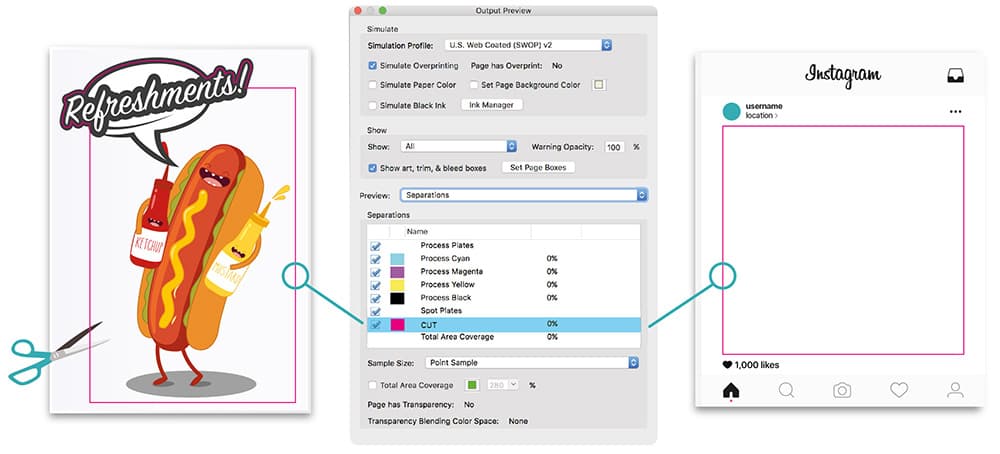
A cut path is a vector guide that tells the cutting machine exactly where to trim your design.
Vector Format: You must include a dedicated vector path within your artwork.
Placement: Your cut paths should be positioned in the exact shape and size required. For standard cut to shape artwork, use the CUT spot colour for the cutting path. If your artwork includes both an outer trim and internal cut out areas, follow the Stencil Type Cutting instructions below.
Stroke Weight: Apply a stroke weight of 0.1pt (not a fill) to the path with overprint turned on.
We identify the cutting line through a specific naming convention. If this is not set correctly, the line may be printed onto your design instead of being used as a cut guide.
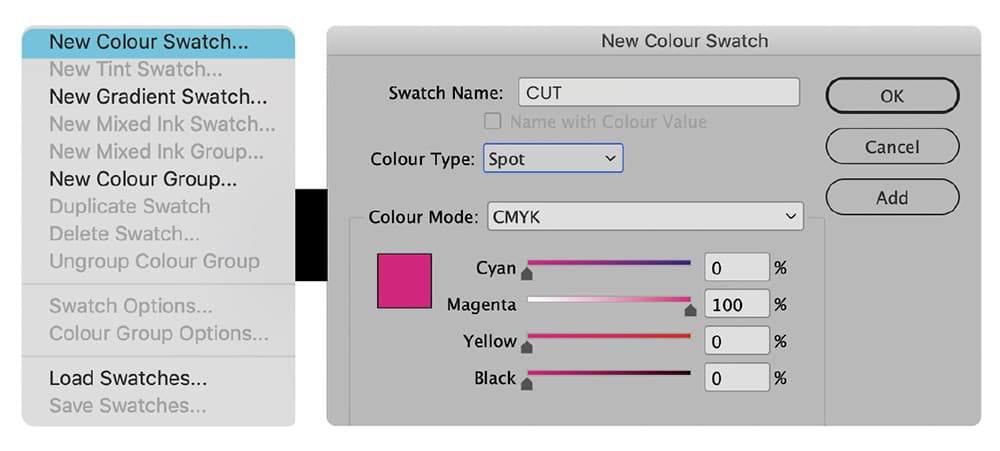
Swatch Name: You must rename your spot colour swatch exactly to CUT (all caps).
Colour Type: The swatch must be set as a Spot Colour, not CMYK.
Visual Identification: We recommend using a high-contrast colour, such as 100% Magenta, so you can easily identify the path within your document.
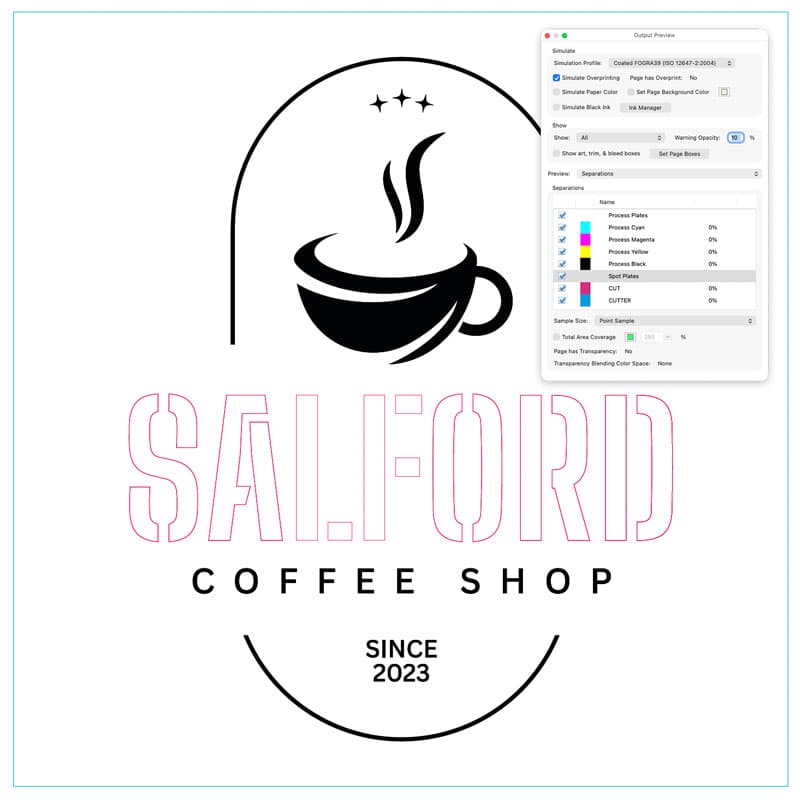
Some designs require both internal cut areas and an outer trim. This could be a full sheet with shapes or elements cut out of it, or a custom shape with additional areas cut out from the middle.
For this type of artwork, you will need to include a second cutting path so our cutting equipment can distinguish the outer trim from the internal cut areas.
Swatch Name: Create an additional spot colour swatch named exactly CUTTER in all caps.
Colour Type: The CUTTER swatch must be set as a Spot Colour, not CMYK.
Visual Identification: Set the CUTTER spot colour to 100% Cyan so it can be clearly distinguished from the CUT path.
Placement: Apply the CUTTER spot colour to the vector path around the outer trim area of your artwork. Continue to use the CUT spot colour for the elements or shapes being cut from within the design.
IMPORTANT! Any parts of the design that need to remain in the finished piece must be connected to the surrounding material. Add suitable bridges between isolated elements and the main design to prevent sections becoming loose or falling through once cut. This is particularly important for enclosed areas within letters, shapes and detailed stencil style artwork.
To ensure a professional finish, your source files must meet high-quality print standards.
CMYK Mode: Use CMYK images in your artwork. Any RGB or Pantone colours will be automatically converted to CMYK, which may cause a colour shift.
High Resolution: Always use professional, high-resolution images of 300dpi or above. Low-quality or pixelated source files will significantly reduce the sharpness of your final print.
Need more help? Explore our additional support guides for expert advice on artwork setup, print file preparation, bleed and crop marks, colour setup, large format artwork and troubleshooting common print file issues.
Our support guides also cover paper stock selection, premium print finishes including spot UV and Scodix, preparing print-ready artwork and understanding the best setup for a wide range of printed products.
Before ordering, you can also use our artwork technical check tool to identify common artwork problems, including low resolution images, missing bleed, incorrect dimensions and RGB colour profiles.
You can also browse our full range of print products, including banners, business cards, flyers, posters and large format printing solutions.