Size
Quantity
Essential
23-point automated check
Free
Advanced
41-point inspection by a prepress technician
FREE if using your Print Perk Points at checkout
Order summary:
Personalised Giant Mug
Quantity: x1 | Unit Size: 15oz (450ml) | Material: Jumbo Mug | Print Area: Single Sided | Finishing Types: White |
Artwork Technical Check: Essential - FREE
See what our customers say about Personalised Giant Mug
Product description
Escalate your coffee break to epic proportions with our custom Giant Mugs, where size meets style in a mug that's as impressive as your favourite beverage. Available in generous 15oz and 20oz sizes, these personalised jumbo mugs are designed to make a bold statement whether at home, in the office or at a promotional event.
Crafted from high-quality ceramic, our extra-large mugs are not only durable but also feature sublimation printing for vibrant, long-lasting designs. Dishwasher safe for easy cleaning, our jumbo mugs combine practicality with eye-catching visuals. Whether showcasing your logo or personalising with creative graphics, each sip ensures that your message stands out.
Elevate your coffee or tea routine and transform every break into an extraordinary experience. Our large personalised mugs are more than just a beverage holder—they are a statement piece that brings both style and functionality to your daily ritual.
Promotional giveaways, personalised gifting, merchandise and more.
Top tip
Maximise your design impact by using bold graphics and colours that stand out, ensuring your message is eye-catching with every sip.
Looking for more personalised drinkware? Explore our diverse range of custom mugs today.
Design guidelines
To make artwork setup simple, we recommend downloading the relevant template from the 'Product Templates' section above. Don’t forget to follow the template instructions and delete the 'guide' layer before exporting your design to a PDF.
For best printing results, ensure your artwork and images are RGB. If you use CMYK Pantone or spot colours in any element of your artwork, we will automatically convert them to RGB which may change your colour profile.
To eliminate any font issues, make sure all fonts are ‘embedded’ or ‘converted to outlines’ before creating your PDF print file. To ensure legibility, we recommend using a minimum font size of 10pt.
For optimal image print quality, ensure all images are 300dpi to 450dpi. Anything lower than 300dpi will give poor image quality. Images higher than 450dpi will result in high file sizes and may cause longer upload times.
To avoid alignment issues during cutting, be sure to include ‘crop marks’ (offset 10mm) and ‘document bleed’ when exporting your artwork file to PDF. Refer to our product templates for the required bleed specifications.
To meet our print requirements, ensure your file is exported in Adobe PDF (Print) format, ideally as PDF/X-1a: 2001.
Need further guidance? Our help centre is here to provide the answers.
How to print with Canva
We provide free Canva templates for many of our products to make artwork setup quick and print ready. If this product displays a Canva icon above, click it to open the correct template in Canva. Each template includes the correct dimensions, bleed and safe zones to help you set up your artwork correctly from the start.
Once your design is complete, download your artwork and return here to place your order.
If this product does not currently include a Canva template, you can still browse our full collection of Canva-compatible templates to find suitable alternatives.
When opening a template, it will launch in a new tab with all guides preloaded for you. Remember to remove any template guide layers before exporting your final artwork.
Need help getting started with WTTB Canva templates? Read the WTTB Canva template guide or watch our YouTube tutorial on how to use WTTB Canva templates.
For the most accurate print results, always set your design to CMYK colour mode where possible. Canva designs are usually created in RGB, which may cause slight colour shifts when converted for print.
We recommend checking colours carefully before exporting to help avoid unexpected results in your final print.
Need help setting up colours correctly? Read the print colour guide or watch our YouTube tutorial on how to get accurate print colours in Canva.
Use Canva fonts at a minimum size of 10pt to help maintain legibility when printed. Keep all important text within the safe area to prevent anything being trimmed during production.
For images, always use high resolution files at 300 DPI or higher. Low resolution images can appear blurry or pixelated once printed.
Need help preparing artwork for high quality print? Read our artwork resolution guide or watch our YouTube tutorial on how to export Canva designs for high quality print.
Extend any backgrounds, colours or images fully into the bleed area to avoid unwanted white edges after trimming. Keep important text, logos and key design elements safely inside the designated safe zone. Correct bleed setup is essential for achieving a professional print finish.
Need help setting up bleed correctly? Read our bleed setup guide or watch our YouTube tutorial on how to set up bleed in Canva for print ready designs.
When exporting from Canva, choose PDF Print as your file format and ensure 'Crop Marks and Bleed' is selected before downloading your artwork.
Once your artwork has been finalised, upload the completed PDF when placing your order with WTTB.
Need help exporting your artwork? Visit our Canva Hub for step by step guides on creating and exporting print ready designs in Canva, or watch our YouTube tutorial on how to export Canva designs for print with WTTB below.
Product description
Escalate your coffee break to epic proportions with our custom Giant Mugs, where size meets style in a mug that's as impressive as your favourite beverage. Available in generous 15oz and 20oz sizes, these personalised jumbo mugs are designed to make a bold statement whether at home, in the office or at a promotional event.
Crafted from high-quality ceramic, our extra-large mugs are not only durable but also feature sublimation printing for vibrant, long-lasting designs. Dishwasher safe for easy cleaning, our jumbo mugs combine practicality with eye-catching visuals. Whether showcasing your logo or personalising with creative graphics, each sip ensures that your message stands out.
Elevate your coffee or tea routine and transform every break into an extraordinary experience. Our large personalised mugs are more than just a beverage holder—they are a statement piece that brings both style and functionality to your daily ritual.
Promotional giveaways, personalised gifting, merchandise and more.
Top tip
Maximise your design impact by using bold graphics and colours that stand out, ensuring your message is eye-catching with every sip.
Looking for more personalised drinkware? Explore our diverse range of custom mugs today.
Design guidelines
To make artwork setup simple, we recommend downloading the relevant template from the 'Product Templates' section above. Don’t forget to follow the template instructions and delete the 'guide' layer before exporting your design to a PDF.
For best printing results, ensure your artwork and images are RGB. If you use CMYK Pantone or spot colours in any element of your artwork, we will automatically convert them to RGB which may change your colour profile.
To eliminate any font issues, make sure all fonts are ‘embedded’ or ‘converted to outlines’ before creating your PDF print file. To ensure legibility, we recommend using a minimum font size of 10pt.
For optimal image print quality, ensure all images are 300dpi to 450dpi. Anything lower than 300dpi will give poor image quality. Images higher than 450dpi will result in high file sizes and may cause longer upload times.
To avoid alignment issues during cutting, be sure to include ‘crop marks’ (offset 10mm) and ‘document bleed’ when exporting your artwork file to PDF. Refer to our product templates for the required bleed specifications.
To meet our print requirements, ensure your file is exported in Adobe PDF (Print) format, ideally as PDF/X-1a: 2001.
Need further guidance? Our help centre is here to provide the answers.
How to print with Canva
We provide free Canva templates for many of our products to make artwork setup quick and print ready. If this product displays a Canva icon above, click it to open the correct template in Canva. Each template includes the correct dimensions, bleed and safe zones to help you set up your artwork correctly from the start.
Once your design is complete, download your artwork and return here to place your order.
If this product does not currently include a Canva template, you can still browse our full collection of Canva-compatible templates to find suitable alternatives.
When opening a template, it will launch in a new tab with all guides preloaded for you. Remember to remove any template guide layers before exporting your final artwork.
Need help getting started with WTTB Canva templates? Read the WTTB Canva template guide or watch our YouTube tutorial on how to use WTTB Canva templates.
For the most accurate print results, always set your design to CMYK colour mode where possible. Canva designs are usually created in RGB, which may cause slight colour shifts when converted for print.
We recommend checking colours carefully before exporting to help avoid unexpected results in your final print.
Need help setting up colours correctly? Read the print colour guide or watch our YouTube tutorial on how to get accurate print colours in Canva.
Use Canva fonts at a minimum size of 10pt to help maintain legibility when printed. Keep all important text within the safe area to prevent anything being trimmed during production.
For images, always use high resolution files at 300 DPI or higher. Low resolution images can appear blurry or pixelated once printed.
Need help preparing artwork for high quality print? Read our artwork resolution guide or watch our YouTube tutorial on how to export Canva designs for high quality print.
Extend any backgrounds, colours or images fully into the bleed area to avoid unwanted white edges after trimming. Keep important text, logos and key design elements safely inside the designated safe zone. Correct bleed setup is essential for achieving a professional print finish.
Need help setting up bleed correctly? Read our bleed setup guide or watch our YouTube tutorial on how to set up bleed in Canva for print ready designs.
When exporting from Canva, choose PDF Print as your file format and ensure 'Crop Marks and Bleed' is selected before downloading your artwork.
Once your artwork has been finalised, upload the completed PDF when placing your order with WTTB.
Need help exporting your artwork? Visit our Canva Hub for step by step guides on creating and exporting print ready designs in Canva, or watch our YouTube tutorial on how to export Canva designs for print with WTTB below.
Giant mugs are oversized mugs made from ceramic material, designed to hold a larger volume of liquid than standard mugs. They are popular for their fun, bold look and practicality, offering extra room for more substantial drinks or even for serving soups and other foods.
Our mugs are printed using a process called sublimation. The design is first printed onto a special transfer paper using sublimation ink, then placed on the mug and heated in a press. The heat causes the ink fuse directly onto the mug's surface, creating a vibrant, durable design that won’t peel or fade.
Our giant mugs come in two sizes: 15oz, with a capacity of 450ml, and 20oz, with a capacity of 590ml.
Yes, giant mugs are dishwasher and microwave safe.
The turnaround time for jumbo mug printing depends on your chosen product specification and finishing options. For faster delivery, we offer express production upgrades at an additional cost. To ensure your order is delivered on time, it is important we receive your artwork by the cut-off time indicated on both the product page and basket.
Please note: If your file is submitted after the cut-off time or if corrected artwork isn't provided before the next cut-off time following rejection, it will delay delivery by one working day.
We offer free standard delivery, with optional upgrades available for expedited service, including pre-10:30 AM and pre-12:00 PM for an additional cost.
Yes, we offer international delivery. Contact our Bespoke team for a shipping quote.
Yes, we can arrange split deliveries. Contact our Bespoke team to let us know how you'd like your order sent.
Uploading giant mug artwork is a breeze. After placing your order, click the upload button on the confirmation page. You can also upload your artwork through the Orders tab of "My Account".
Most orders are sent in boxes. For larger quantities, we may secure your order on a pallet (kerbside delivery). If your location doesn’t have tail-lift access, please contact us after placing your order so we can help arrange the best delivery option. Be sure to have your order number to hand.
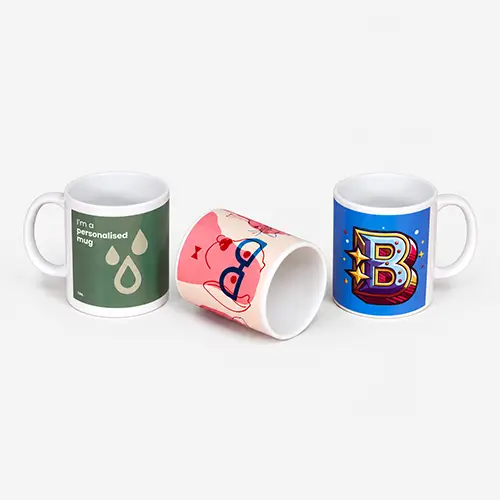
Giant mugs are oversized mugs made from ceramic material, designed to hold a larger volume of liquid than standard mugs. They are popular for their fun, bold look and practicality, offering extra room for more substantial drinks or even for serving soups and other foods.
Our mugs are printed using a process called sublimation. The design is first printed onto a special transfer paper using sublimation ink, then placed on the mug and heated in a press. The heat causes the ink fuse directly onto the mug's surface, creating a vibrant, durable design that won’t peel or fade.
Our giant mugs come in two sizes: 15oz, with a capacity of 450ml, and 20oz, with a capacity of 590ml.
Yes, giant mugs are dishwasher and microwave safe.
The turnaround time for jumbo mug printing depends on your chosen product specification and finishing options. For faster delivery, we offer express production upgrades at an additional cost. To ensure your order is delivered on time, it is important we receive your artwork by the cut-off time indicated on both the product page and basket.
Please note: If your file is submitted after the cut-off time or if corrected artwork isn't provided before the next cut-off time following rejection, it will delay delivery by one working day.
We offer free standard delivery, with optional upgrades available for expedited service, including pre-10:30 AM and pre-12:00 PM for an additional cost.
Yes, we offer international delivery. Contact our Bespoke team for a shipping quote.
Yes, we can arrange split deliveries. Contact our Bespoke team to let us know how you'd like your order sent.
Uploading giant mug artwork is a breeze. After placing your order, click the upload button on the confirmation page. You can also upload your artwork through the Orders tab of "My Account".
Most orders are sent in boxes. For larger quantities, we may secure your order on a pallet (kerbside delivery). If your location doesn’t have tail-lift access, please contact us after placing your order so we can help arrange the best delivery option. Be sure to have your order number to hand.