||

Prices
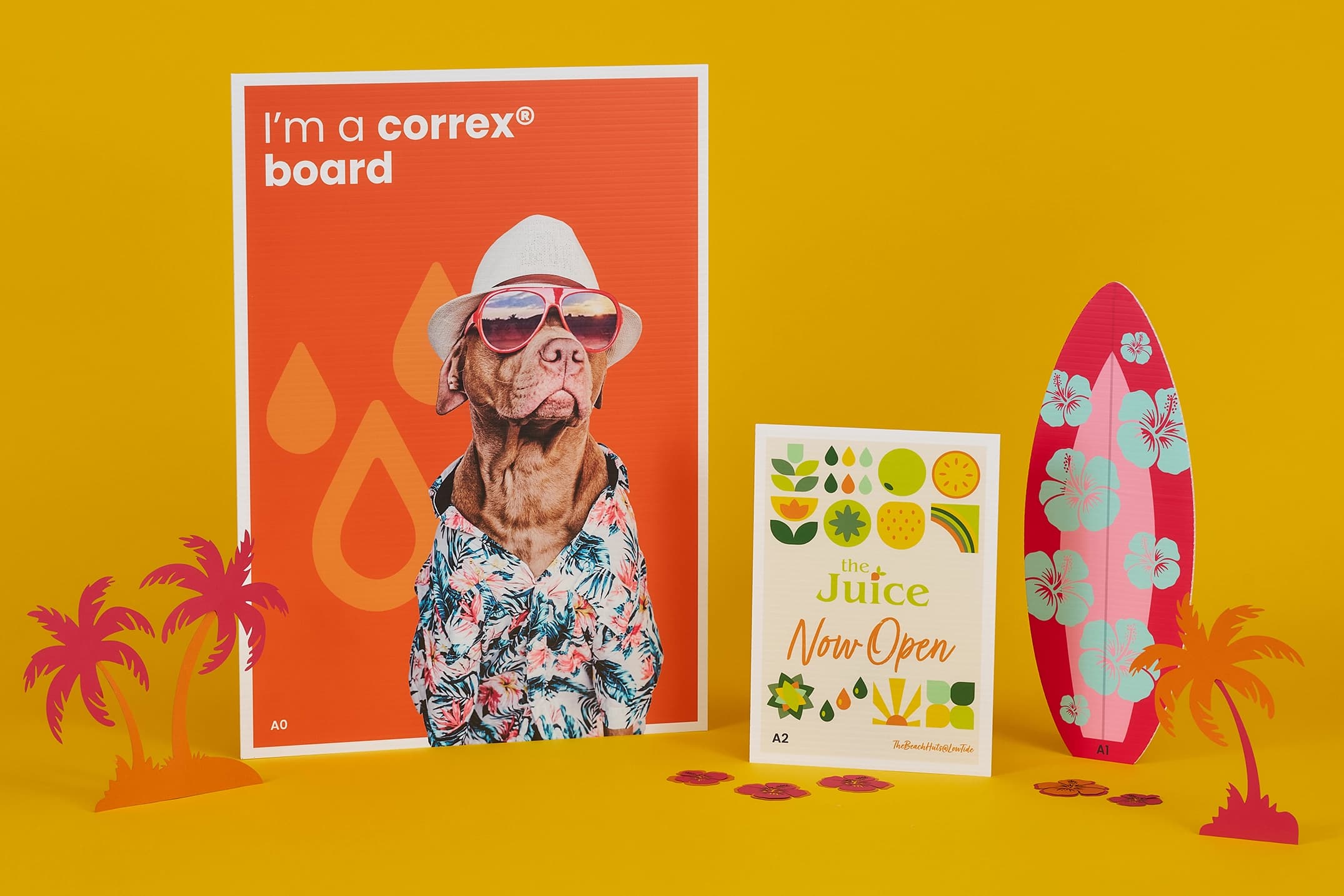


Correx® boardAvailable in 6mm and 4mm thickness.
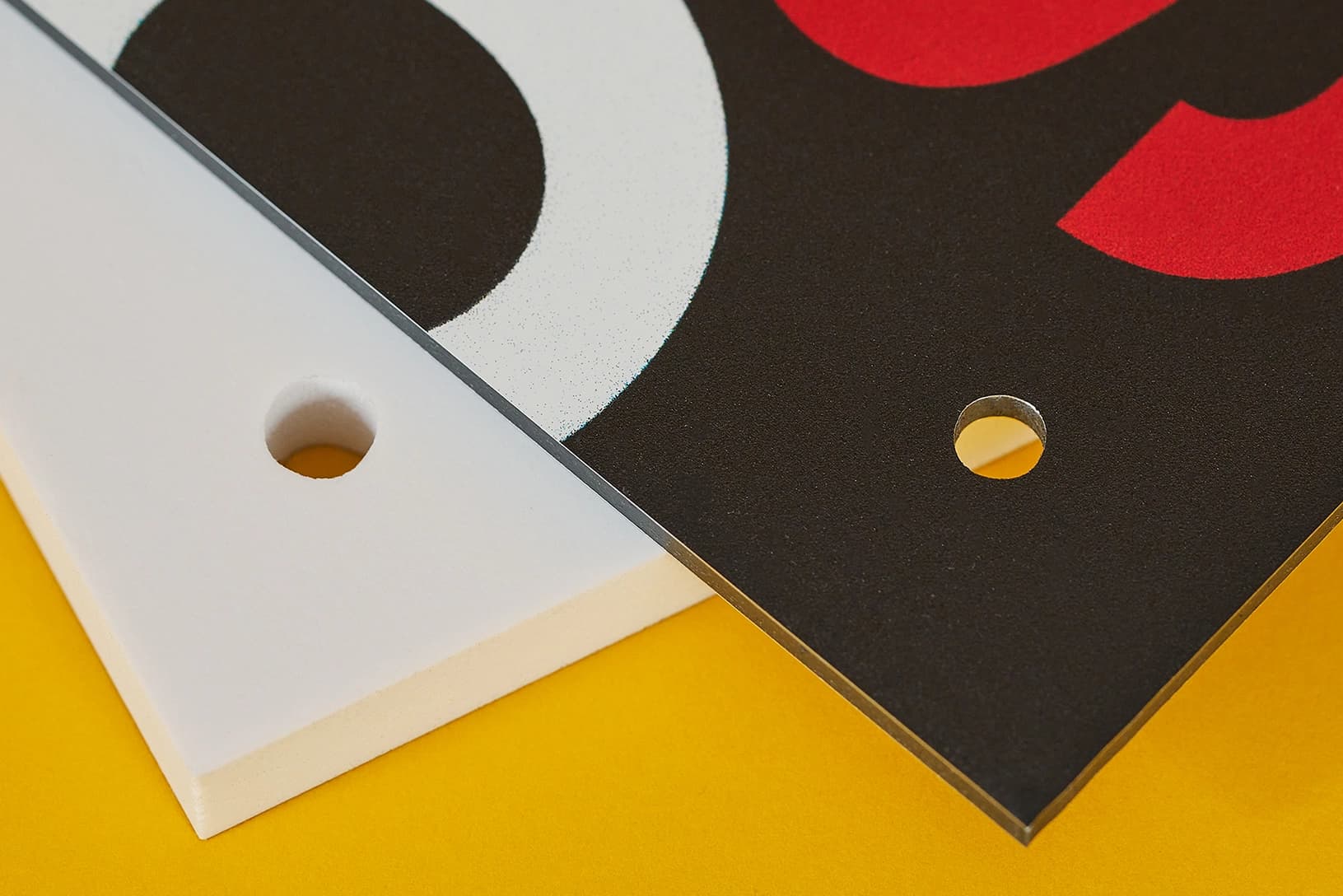
Drill HolesAdd 5mm holes to your printed signage. Ideal for screw holes and hanging your signage.
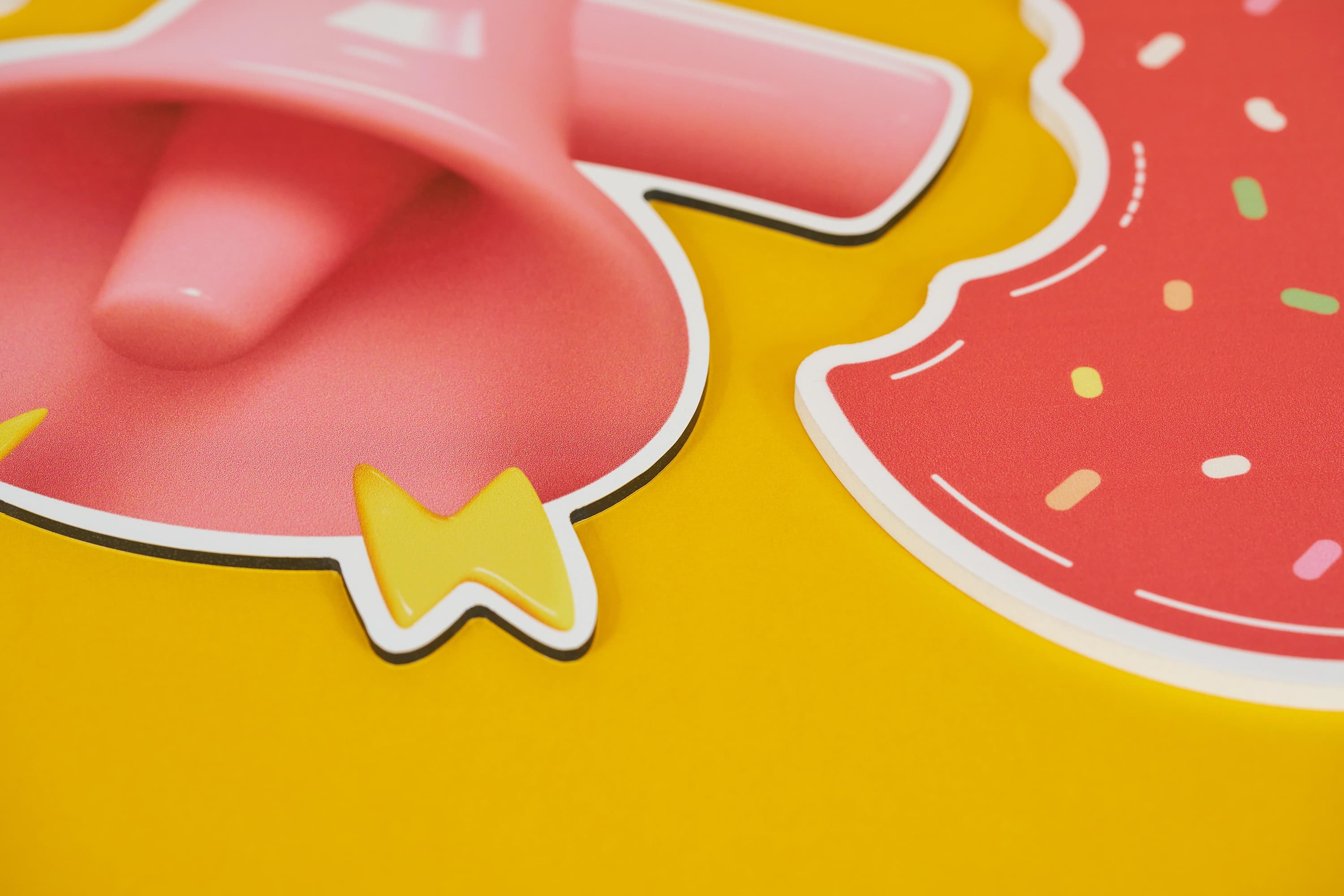
Cut to shapeBe unique and cut your print to ANY shape.
 Unparalleled knowledge,
Size
Orientation
Printed Sides
Material
Drill holes
Cutting
Versions
Quantity Per Version
Essential
23-point automated check
Free
Advanced
41-point inspection by a prepress technician
FREE if using your Print Perk Points at checkout
Order summary:
Correx® Boards

Quantity Per Version: x1 | Paper Size: A3 (297 x 420mm) | Orientation: Portrait | Printed Sides: Single Sided | Material: 3.5mm Correx | Colours: Full Colour | Drill Holes: None | Cutting: Square Corners |
Artwork Technical Check: Essential - FREE
Unparalleled knowledge,See what our customers say about Correx® Boards
Correx® boardAvailable in 6mm and 4mm thickness.
Drill HolesAdd 5mm holes to your printed signage. Ideal for screw holes and hanging your signage.
Cut to shapeBe unique and cut your print to ANY shape.
Product description
Step up your signage with our custom Correx Boards, designed to make every message stand out. Whether for high visibility campaigns, retail promotions or safety signage, our Correx board printing offers a vibrant, durable and cost effective solution for impactful advertising. From promotional displays to outdoor signs, these lightweight corrugated plastic signs help get your message noticed.
Available in sizes from A4 to A0 and in both portrait and landscape orientations, our printed Correx boards are made from 3.5mm or 5mm thick material, making them ideal for indoor and outdoor use. With flexible Correx sign printing options, choose from single or double sided printing, plus square, rounded or custom cut to shape edges to suit your project.
For easy installation, select drilling options in the top corners or all four, making your Correx signs simple to display wherever you need them. Combining durability with visual appeal, our Correx® boards offer a practical, affordable solution for temporary signage, advertising and promotional displays.
Retail promotions, outdoor advertising, campaign materials and more.
Top tip
For the best results, use bold, high-contrast colours to ensure your message stand out from a distance.
Searching for alternative display options? Explore our wide range of signage options.
Design guidelines
To make artwork setup simple, download the relevant template from the Production templates section above. Follow the instructions provided and remember to remove the 'Guide' layer before exporting your artwork as a PDF.
For the best printing results, ensure your artwork and images are in CMYK. If you use RGB, Pantone or spot colours, these will be converted to CMYK during production, which may affect how your colours appear in print.
To avoid font issues, make sure all fonts are embedded or converted to outlines before exporting your PDF. For readability, we recommend using a minimum font size of 10pt.
For the best print quality, aim for images between 300dpi and 450dpi at their final print size. Lower resolutions may appear blurry or pixelated, while higher resolutions can increase file sizes. Check product template for any specific requirements.
To avoid alignment issues during cutting, include crop marks with a 10mm offset and document bleed when exporting your artwork as a PDF. Refer to the relevant product template for the required bleed specifications, as these vary by product.
All artwork must be supplied as a print ready PDF. We recommend exporting in Adobe PDF (Print) format, ideally using the PDF/X 1a:2001 standard.
Need more help preparing your artwork Explore our support guides for further guidance.
Designing with Canva
We offer free Canva templates for many of our products, complete with the correct dimensions, bleed and safe zones. Where available, you'll find the Canva template in the Production templates section above, ready to open and personalise.
Once your design is complete, download it as a PDF Print file and return to our website to place your order and upload your artwork. Remember to remove any guide layers before exporting.
Need help getting started? Read our Canva template guide or explore our wider collection of Canva templates for other products.
Canva uses RGB colour mode by default, which is designed for screens rather than print. For the best printing results, make sure you select CMYK when exporting your artwork. Converting from RGB to CMYK can cause slight colour shifts, so always check your exported PDF carefully before uploading to avoid unexpected results.
Need help with colours? Read our Canva colour guide.
Use fonts of at least 10pt to maintain legibility and keep important text within the safe zone. Use images at 300dpi or higher at their final size to avoid blurry or pixelated results.
Need help with image quality? Read our artwork resolution guide or watch our YouTube tutorial on how to export Canva designs for print.
Extend backgrounds, colours and images into the bleed area to avoid unwanted white edges after trimming. Keep important text, logos and design elements within the safe zone, and follow the bleed requirements for your chosen product.
Need help setting up bleed? Read our Canva bleed setup guide.
When exporting your finished design from Canva, select PDF Print and enable 'Crop Marks and Bleed'. This ensures your artwork includes the necessary bleed for printing. Remember to remove any template guides before downloading your file.
Need help exporting your artwork? Explore our Canva Hub for further guidance, or watch our tutorial below.
Product description
Step up your signage with our custom Correx Boards, designed to make every message stand out. Whether for high visibility campaigns, retail promotions or safety signage, our Correx board printing offers a vibrant, durable and cost effective solution for impactful advertising. From promotional displays to outdoor signs, these lightweight corrugated plastic signs help get your message noticed.
Available in sizes from A4 to A0 and in both portrait and landscape orientations, our printed Correx boards are made from 3.5mm or 5mm thick material, making them ideal for indoor and outdoor use. With flexible Correx sign printing options, choose from single or double sided printing, plus square, rounded or custom cut to shape edges to suit your project.
For easy installation, select drilling options in the top corners or all four, making your Correx signs simple to display wherever you need them. Combining durability with visual appeal, our Correx® boards offer a practical, affordable solution for temporary signage, advertising and promotional displays.
Retail promotions, outdoor advertising, campaign materials and more.
Top tip
For the best results, use bold, high-contrast colours to ensure your message stand out from a distance.
Searching for alternative display options? Explore our wide range of signage options.
Design guidelines
To make artwork setup simple, download the relevant template from the Production templates section above. Follow the instructions provided and remember to remove the 'Guide' layer before exporting your artwork as a PDF.
For the best printing results, ensure your artwork and images are in CMYK. If you use RGB, Pantone or spot colours, these will be converted to CMYK during production, which may affect how your colours appear in print.
To avoid font issues, make sure all fonts are embedded or converted to outlines before exporting your PDF. For readability, we recommend using a minimum font size of 10pt.
For the best print quality, aim for images between 300dpi and 450dpi at their final print size. Lower resolutions may appear blurry or pixelated, while higher resolutions can increase file sizes. Check product template for any specific requirements.
To avoid alignment issues during cutting, include crop marks with a 10mm offset and document bleed when exporting your artwork as a PDF. Refer to the relevant product template for the required bleed specifications, as these vary by product.
All artwork must be supplied as a print ready PDF. We recommend exporting in Adobe PDF (Print) format, ideally using the PDF/X 1a:2001 standard.
Need more help preparing your artwork Explore our support guides for further guidance.
Designing with Canva
We offer free Canva templates for many of our products, complete with the correct dimensions, bleed and safe zones. Where available, you'll find the Canva template in the Production templates section above, ready to open and personalise.
Once your design is complete, download it as a PDF Print file and return to our website to place your order and upload your artwork. Remember to remove any guide layers before exporting.
Need help getting started? Read our Canva template guide or explore our wider collection of Canva templates for other products.
Canva uses RGB colour mode by default, which is designed for screens rather than print. For the best printing results, make sure you select CMYK when exporting your artwork. Converting from RGB to CMYK can cause slight colour shifts, so always check your exported PDF carefully before uploading to avoid unexpected results.
Need help with colours? Read our Canva colour guide.
Use fonts of at least 10pt to maintain legibility and keep important text within the safe zone. Use images at 300dpi or higher at their final size to avoid blurry or pixelated results.
Need help with image quality? Read our artwork resolution guide or watch our YouTube tutorial on how to export Canva designs for print.
Extend backgrounds, colours and images into the bleed area to avoid unwanted white edges after trimming. Keep important text, logos and design elements within the safe zone, and follow the bleed requirements for your chosen product.
Need help setting up bleed? Read our Canva bleed setup guide.
When exporting your finished design from Canva, select PDF Print and enable 'Crop Marks and Bleed'. This ensures your artwork includes the necessary bleed for printing. Remember to remove any template guides before downloading your file.
Need help exporting your artwork? Explore our Canva Hub for further guidance, or watch our tutorial below.
Turnaround times depend on your chosen product specifications and finishing options. For faster delivery, we offer express production upgrades at an additional cost. (Quantity limits apply) To avoid delays, make sure we receive your artwork before the cut off time shown on the product page and in your basket.
Please note: If your artwork is uploaded after the cut off time, or corrected artwork isn't supplied before the next cut off following rejection, delivery will be delayed by one working day.
Standard UK delivery is free, with optional paid upgrades for faster delivery, including before 10.30am and 12 noon services where available.
Yes, we offer international delivery. Contact our Bespoke team for a shipping quote.
Yes, we can arrange split deliveries to multiple addresses. Contact our Bespoke team with your requirements, and we'll help arrange delivery.
Once you've placed your order, you can upload your print ready PDF artwork using the upload button on the confirmation page. Alternatively, upload your files through the Orders section of My Account.
Colour matching isn't available on standard online orders. If you need to match a specific colour, submit a bespoke quote request and our team will review your requirements.
Most orders are packaged in boxes, while larger quantities may be secured on a pallet for kerbside delivery. If your location has access restrictions or requires special delivery arrangements, please contact us after placing your order, with your order number to hand.
Correx®, spelt Corex, is a lightweight corrugated plastic board with hollow channels called flutes. These give it a slightly ridged surface. Correx boards are a practical, affordable choice for temporary signage, including retail promotions, event signage, directional signs and advertising campaigns.
Choose 3.5mm Correx for lightweight, economical signs and temporary displays. The thicker 5mm option provides greater rigidity, making it useful for larger boards or signs that need more support. Both thicknesses are suitable for indoor and outdoor use, but your board size, positioning and fixing method also affect its stability.
Yes. Correx boards are weather resistant and suitable for temporary outdoor signs. Their lifespan depends on exposure to sunlight, wind and weather, as well as how securely they are installed. Larger boards need adequate support to reduce bending and movement. For a more permanent outdoor display, consider our Dibond boards.
Choose Correx for lightweight, affordable temporary signage. Foamex offers a smoother surface for retail signs, exhibition panels and other presentation displays. Dibond provides greater rigidity and durability for more permanent outdoor signage. The best choice depends on where your sign will be displayed, how long you need it and the finish you want.
Our printed Correx boards are available in standard sizes from A4 to A0, with portrait and landscape options. Select Custom to enter your own dimensions. If you need Correx boards larger than 1500 × 1000mm, request a bespoke quote.
Choose drilling in the top two corners or all four corners to help secure your boards to a suitable support using appropriate fixings, such as cable ties or screws. Standard holes are 5mm in diameter and are added automatically, so you do not need to mark them on your artwork.
For different hole sizes or positions, select Cut to Shape and mark the required holes using a spot colour named CUT. Keep important text and logos clear of the fixing positions, and follow our cut path guide.
Yes. Choose Square Corners for a standard rectangular board or Cut to Shape for a custom outline. Custom shapes require a vector cut path in your artwork to show where the board should be cut.
Follow our cut path guide, which explains how to mark the outer shape using CUTTER and any internal cuts using CUT.
Flutes are the hollow channels running through the board. We cannot guarantee their direction, so selecting portrait or landscape orientation does not determine which way the flutes will run.
If your installation requires a specific flute direction, request a bespoke quote before ordering.
Yes. Use the Versions option to order different designs with the same size, material and finishing specifications. Enter the number of designs under Versions and the number of copies required for each under Quantity Per Version. Supply separate artwork for each version.
Correx®, spelt Corex, is a lightweight corrugated plastic board with hollow channels called flutes. These give it a slightly ridged surface. Correx boards are a practical, affordable choice for temporary signage, including retail promotions, event signage, directional signs and advertising campaigns.
Choose 3.5mm Correx for lightweight, economical signs and temporary displays. The thicker 5mm option provides greater rigidity, making it useful for larger boards or signs that need more support. Both thicknesses are suitable for indoor and outdoor use, but your board size, positioning and fixing method also affect its stability.
Yes. Correx boards are weather resistant and suitable for temporary outdoor signs. Their lifespan depends on exposure to sunlight, wind and weather, as well as how securely they are installed. Larger boards need adequate support to reduce bending and movement. For a more permanent outdoor display, consider our Dibond boards.
Choose Correx for lightweight, affordable temporary signage. Foamex offers a smoother surface for retail signs, exhibition panels and other presentation displays. Dibond provides greater rigidity and durability for more permanent outdoor signage. The best choice depends on where your sign will be displayed, how long you need it and the finish you want.
Our printed Correx boards are available in standard sizes from A4 to A0, with portrait and landscape options. Select Custom to enter your own dimensions. If you need Correx boards larger than 1500 × 1000mm, request a bespoke quote.
Choose drilling in the top two corners or all four corners to help secure your boards to a suitable support using appropriate fixings, such as cable ties or screws. Standard holes are 5mm in diameter and are added automatically, so you do not need to mark them on your artwork.
For different hole sizes or positions, select Cut to Shape and mark the required holes using a spot colour named CUT. Keep important text and logos clear of the fixing positions, and follow our cut path guide.
Yes. Choose Square Corners for a standard rectangular board or Cut to Shape for a custom outline. Custom shapes require a vector cut path in your artwork to show where the board should be cut.
Follow our cut path guide, which explains how to mark the outer shape using CUTTER and any internal cuts using CUT.
Flutes are the hollow channels running through the board. We cannot guarantee their direction, so selecting portrait or landscape orientation does not determine which way the flutes will run.
If your installation requires a specific flute direction, request a bespoke quote before ordering.
Yes. Use the Versions option to order different designs with the same size, material and finishing specifications. Enter the number of designs under Versions and the number of copies required for each under Quantity Per Version. Supply separate artwork for each version.
Turnaround times depend on your chosen product specifications and finishing options. For faster delivery, we offer express production upgrades at an additional cost. (Quantity limits apply) To avoid delays, make sure we receive your artwork before the cut off time shown on the product page and in your basket.
Please note: If your artwork is uploaded after the cut off time, or corrected artwork isn't supplied before the next cut off following rejection, delivery will be delayed by one working day.
Standard UK delivery is free, with optional paid upgrades for faster delivery, including before 10.30am and 12 noon services where available.
Yes, we offer international delivery. Contact our Bespoke team for a shipping quote.
Yes, we can arrange split deliveries to multiple addresses. Contact our Bespoke team with your requirements, and we'll help arrange delivery.
Once you've placed your order, you can upload your print ready PDF artwork using the upload button on the confirmation page. Alternatively, upload your files through the Orders section of My Account.
Colour matching isn't available on standard online orders. If you need to match a specific colour, submit a bespoke quote request and our team will review your requirements.
Most orders are packaged in boxes, while larger quantities may be secured on a pallet for kerbside delivery. If your location has access restrictions or requires special delivery arrangements, please contact us after placing your order, with your order number to hand.