Prices
Perfect binding uses a strong, flexible thermal glue to attach a wrap-around cover to the "book block" (the internal pages). To ensure your book is bound correctly, your artwork must be supplied in a specific format.
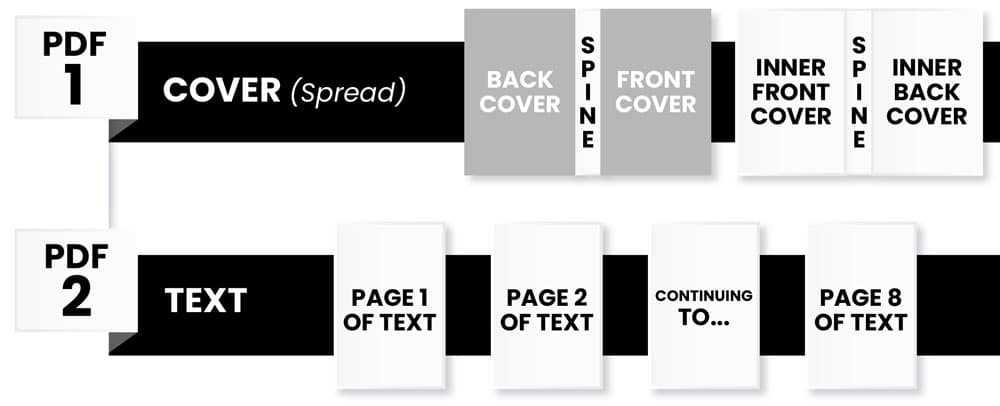
Perfect bound books must be supplied as two separate PDF files. This allows the cover to be printed on a heavier card stock while the internal pages are processed separately (Example below shows a 12-page booklet).
This must contain two spreads:
The Outer Cover: A single spread containing the Back Cover, Spine, and Front Cover.
The Inner Cover: A single spread containing the Inside Front Cover, Spine (left blank), and Inside Back Cover.
All remaining internal pages supplied as a single multi-page PDF in the correct reading order.
To ensure the book block can be gathered and trimmed correctly, please follow these pagination rules:
Divisibility: Page totals for perfect bound books must be divisible by 2.
Reading Order: Supply internal pages in numerical order (Page 1, Page 2, Page 3, etc.). Do not supply them as printer spreads.
Example: For a 12-page booklet, you would supply:
Cover: 2 spreads (Outer and Inner).
Inners: 8 single pages (All remaining text pages).
The cover of a perfect bound book must be designed as a continuous wrap-around spread to accommodate the thickness of the book.
InDesign Export: When exporting your cover file, you must select "Spreads" in your PDF settings.
Spine Calculation: Your spine width must be accurately calculated based on your specific page count and paper thickness. If the spine width is incorrect, the cover will not fit the book block. Our product page automatically calculates your spine with when you enter the page count on the product configurator.
Safe Margin: Avoid placing any text within 10mm of the inner edge (the "gutter" where the page meets the spine). This ensures your text doesn't get lost in the fold and remains easy to read.
Need more help? Explore our additional support guides for expert advice on artwork setup, print file preparation, bleed and crop marks, colour setup, large format artwork and troubleshooting common print file issues.
Our support guides also cover paper stock selection, premium print finishes including spot UV and Scodix, preparing print-ready artwork and understanding the best setup for a wide range of printed products.
Before ordering, you can also use our artwork technical check tool to identify common artwork problems, including low resolution images, missing bleed, incorrect dimensions and RGB colour profiles.
You can also browse our full range of print products, including banners, business cards, flyers, posters and large format printing solutions.
Check out our professional perfect bound books with clean spines, premium print finishes and durable binding options for catalogues, magazines, brochures, reports and more.